RunboardPRO Projects · Beta
One connected workspace
for project work
One connected workspace
for project work
One connected workspace for project work
Tasks, files, contacts, project knowledge, and field work all organised in one connected workspace.
Tasks, files, contacts, project knowledge, and field work all organised in one connected workspace.
Sign up to RunboardPro
Sign up to RunboardPro
No credit
card required
No credit
card required
No credit card required
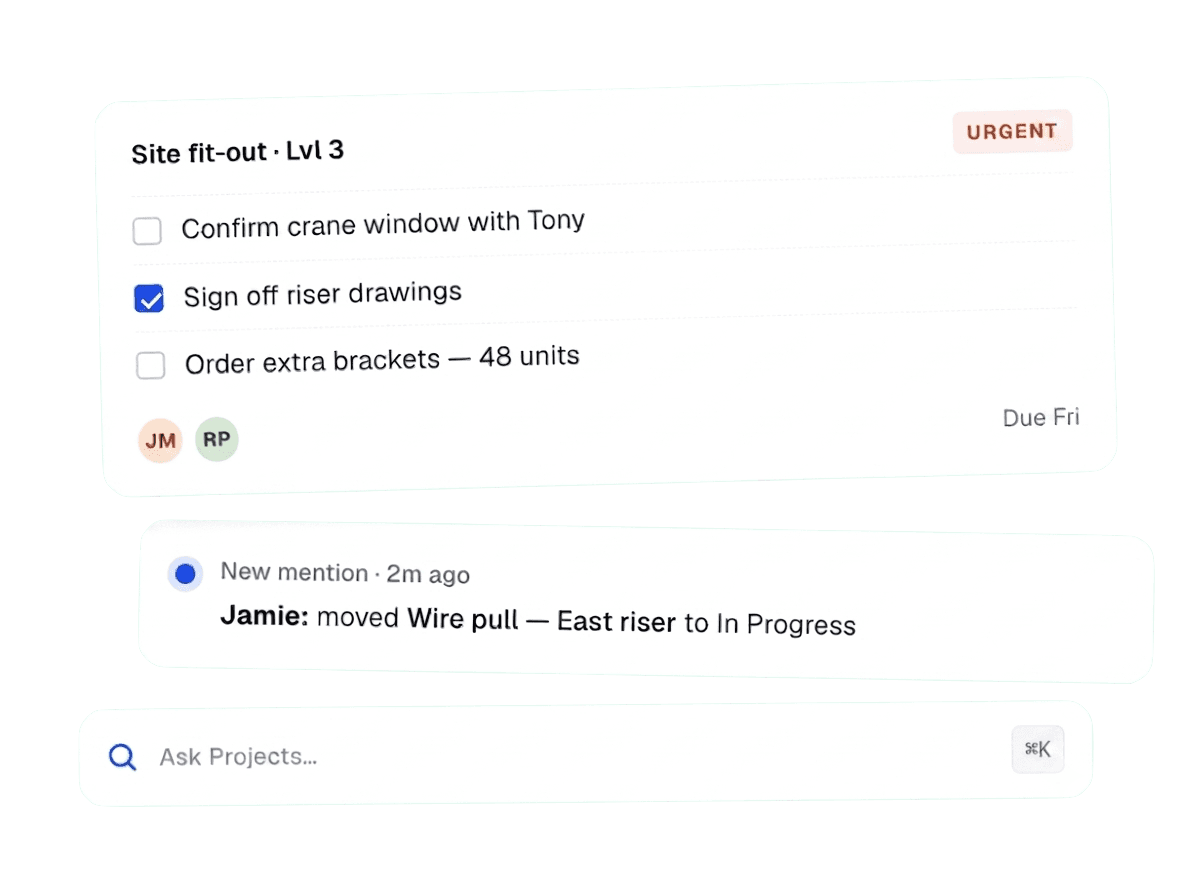
Keep office teams organised
Keep office teams organised
Used by dispatch and warehouse teams across
Australia
Canada
Germany
Thailand
USA
The problem
Project work shouldn’t live in six different apps.
It should live in one.
Project work shouldn’t live in six different apps.
It should live in one.
Project work shouldn’t live in six different apps.
It should live in one.
Tasks sit in spreadsheets. Files live in folders. Notes are split between documents and messages. Teams waste time searching, chasing updates, and trying to understand what needs to happen next.
Tasks sit in spreadsheets. Files live in folders. Notes are split between documents and messages. Teams waste time searching, chasing updates, and trying to understand what needs to happen next.
SPREADSHEETS
Out of date by Tuesday
The site copy doesn’t match the office copy. Nobody knows which one is right.
SPREADSHEETS
Out of date by Tuesday
The site copy doesn’t match the office copy. Nobody knows which one is right.
SPREADSHEETS
Out of date by Tuesday
The site copy doesn’t match the office copy. Nobody knows which one is right.
Buried in a thread of 47
The decision is in there somewhere. Good luck finding it before Friday
Buried in a thread of 47
The decision is in there somewhere. Good luck finding it before Friday
Buried in a thread of 47
The decision is in there somewhere. Good luck finding it before Friday
Buried in a thread of 47
The decision is in there somewhere. Good luck finding it before Friday
GROUP CHATS
“Did anyone action this?”
Messages scroll past. Actions get missed. Nothing gets ticked off.
GROUP CHATS
“Did anyone action this?”
Messages scroll past. Actions get missed. Nothing gets ticked off.
GROUP CHATS
“Did anyone action this?”
Messages scroll past. Actions get missed. Nothing gets ticked off.
SHARED FOLDERS
Three versions of the same file
FINAL. FINAL_v2. FINAL_use_this_one. You know the drill.
SHARED FOLDERS
Three versions of the same file
FINAL. FINAL_v2. FINAL_use_this_one. You know the drill.
SHARED FOLDERS
Three versions of the same file
FINAL. FINAL_v2. FINAL_use_this_one. You know the drill.
How it all connects
One project. One workspace.
Everything points back to the job.
One project.
One workspace.
Everything points back
to the job.
One project.
One workspace.
Everything points
back to the job.
One project.
One workspace.
Everything points back to the job.
Tasks know which files they need. Files know who they're for. Notes link to the contacts. AI search reads it all. You stop hunting and start working.

Tasks
Kanban · list · calendar

Knowledge pages
Scope · notes · handovers

Voice Automation
Speak it — it’s logged

Notifications
Mentions & updates

Your project
One shared workspace connecting the work, people, assets, records, and visibility your operation depends on.

Files
Every drawing, doc & photo

Contacts
Crew, subbies, suppliers

AI search
Find anything in seconds

Field via RunTRAC
Tasks in their pocket
Tasks
Kanban · list · calendar
Knowledge pages
Scope · notes · handovers
Voice Automation
Speak it — it’s logged
Notifications
Mentions & updates
Your project
One shared workspace connecting the work, people, assets, records, and visibility your operation depends on.
Files
Every drawing, doc & photo
Contacts
Crew, subbies, suppliers
AI search
Find anything in seconds
Field via RunTRAC
Tasks in their pocket
Tasks
Kanban · list · calendar
Knowledge pages
Scope · notes · handovers
Voice Automation
Speak it — it’s logged
Notifications
Mentions & updates
Your project
One shared workspace connecting the work, people, assets, records, and visibility your operation depends on.
Files
Every drawing, doc & photo
Contacts
Crew, subbies, suppliers
AI search
Find anything in seconds
Field via RunTRAC
Tasks in their pocket
Tasks
Kanban · list · calendar
Knowledge pages
Scope · notes · handovers
Voice Automation
Speak it — it’s logged
Notifications
Mentions & updates
Your project
One shared workspace connecting the work, people, assets, records, and visibility your operation depends on.
Files
Every drawing, doc & photo
Contacts
Crew, subbies, suppliers
AI search
Find anything in seconds
Field via RunTRAC
Tasks in their pocket
Orchestrate at Scale
Simple enough that your whole team actually uses it.
One task. Every detail.
No more chasing.
One task.
Every detail.
No more chasing.
Create, assign, prioritise, and track project work with clear owners, due dates, statuses, comments, attachments, checklists, reminders, and tags.
Create, assign, prioritise, and track project work with clear owners, due dates, statuses, comments, attachments, checklists, reminders, and tags.
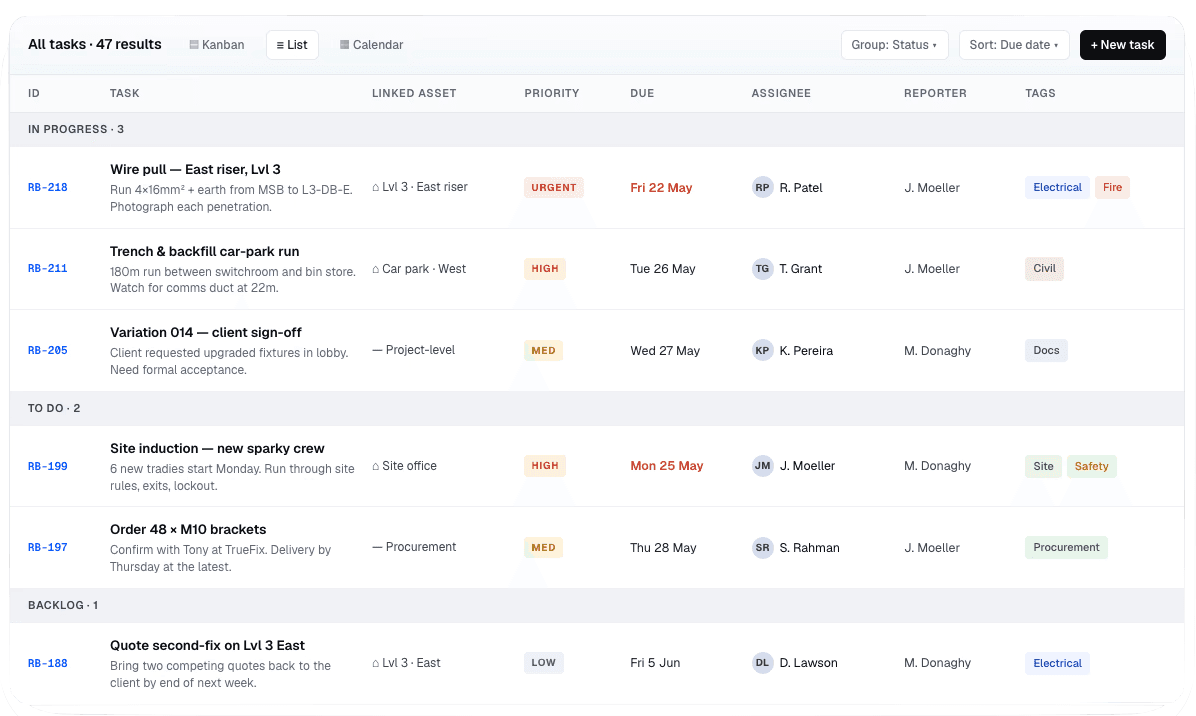
A task system that holds up
Every drawing, permitand spec - in the project, not inbox.
Every drawing, permit and spec
in the project,
not inbox.
Drawings, photos, quotes, certificates, scope notes — uploaded once, found by anyone. No more hunting through folders or asking someone to resend a document.
Drawings, photos, quotes, certificates, scope notes — uploaded once, found by anyone. No more hunting through folders or asking someone to resend a document.
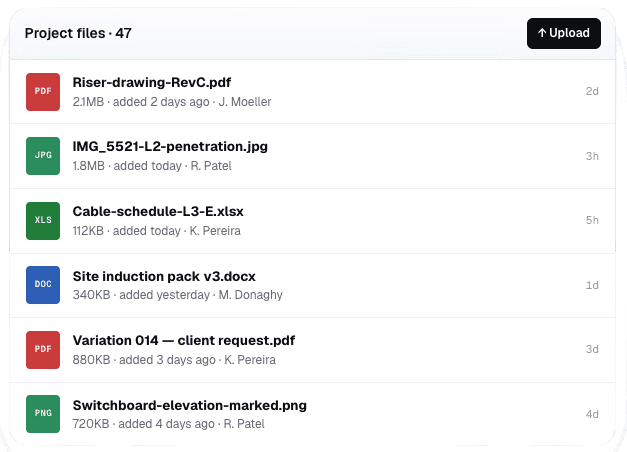
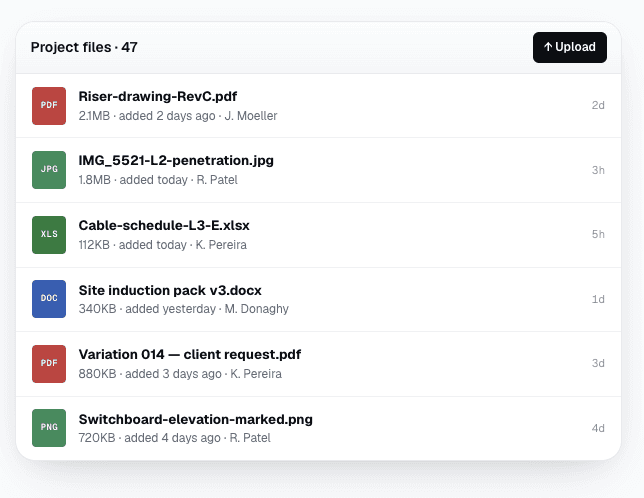
A task system that holds up
One place for every project file.
The story of the job, written down once and collected.
Briefs, scope notes, meeting records, change logs, handover docs — structured pages that live next to the work, not in a separate tool nobody opens.
Briefs, scope notes, meeting records, change logs, handover docs — structured pages that live next to the work, not in a separate tool nobody opens.
Cloud memory
Handovers that don’t depend on one person’s memory
Simple and organised
Plain pages with headings, lists, tables and links
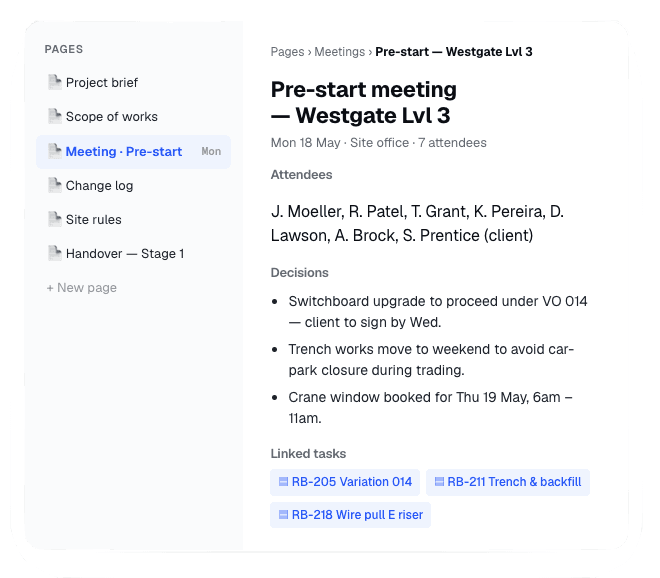
Project knowledge pages
Notifcations to stay across everything.
Without chasing people.
Real-time alerts when something needs you — a task mention, an urgent flag, a job update from the field. One inbox for the project, not seven.
Real-time alerts when something needs you — a task mention, an urgent flag, a job update from the field. One inbox for the project, not seven.
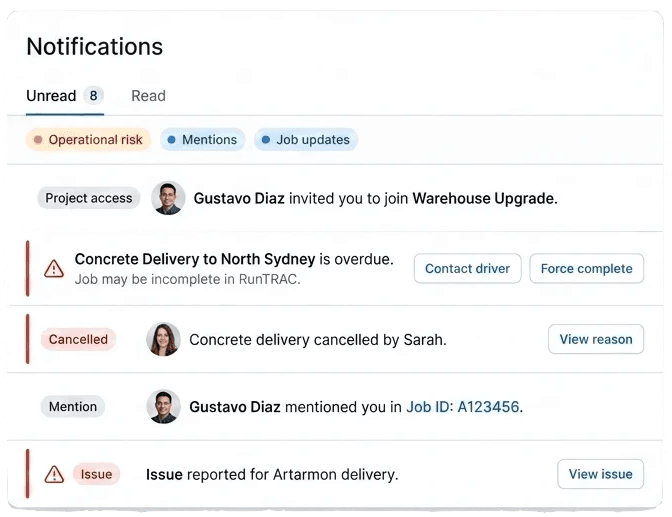
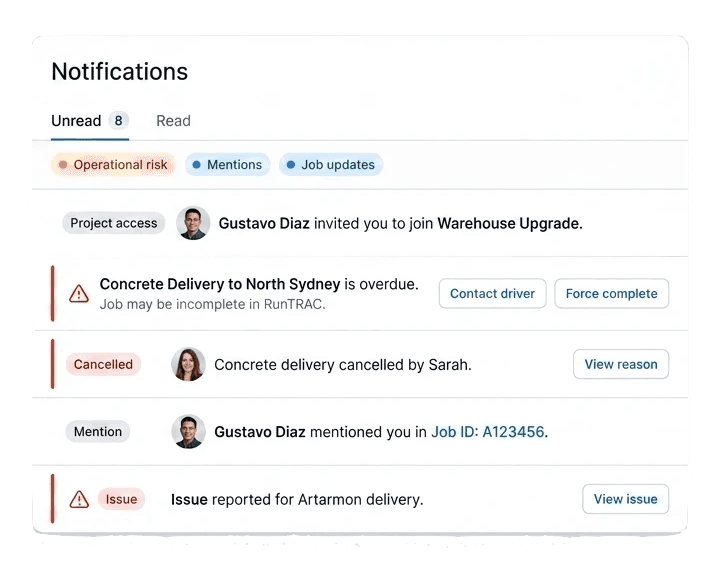
Nothing slips through, nothing gets lost.
Office plans the work.
The field gets the work.
Office plans the work.
The field gets the work.
Push any task to the crew on site.
They see what they need;
Checklist progress
Subtasks
Labels
Due dates
Who’s assigned
All in the RunTRAC mobile app they already use.
Push any task to the crew on site.
They see what they need;
Checklist progress
Subtasks
Labels
Due dates
Who’s assigned
All in the RunTRAC mobile app they already use.
Push any task to the crew
on site.
They see what they need;
Checklist progress
Subtasks
Labels
Due dates
Who’s assigned
All in the RunTRAC mobile app they already use.
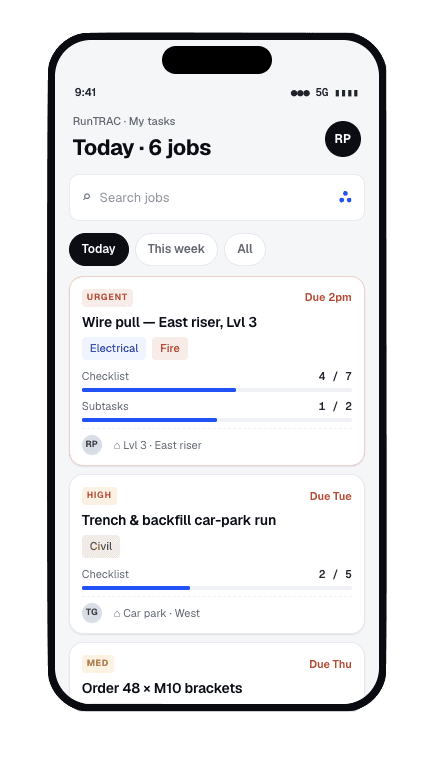

Easy transfer to the field.
Orchestrate at Scale
Simple enough that your whole team actually uses it.
One task. Every detail.
No chasing required.
Create, assign, prioritise, and track project work with clear owners, due dates, statuses, comments, attachments, checklists, reminders, and tags.
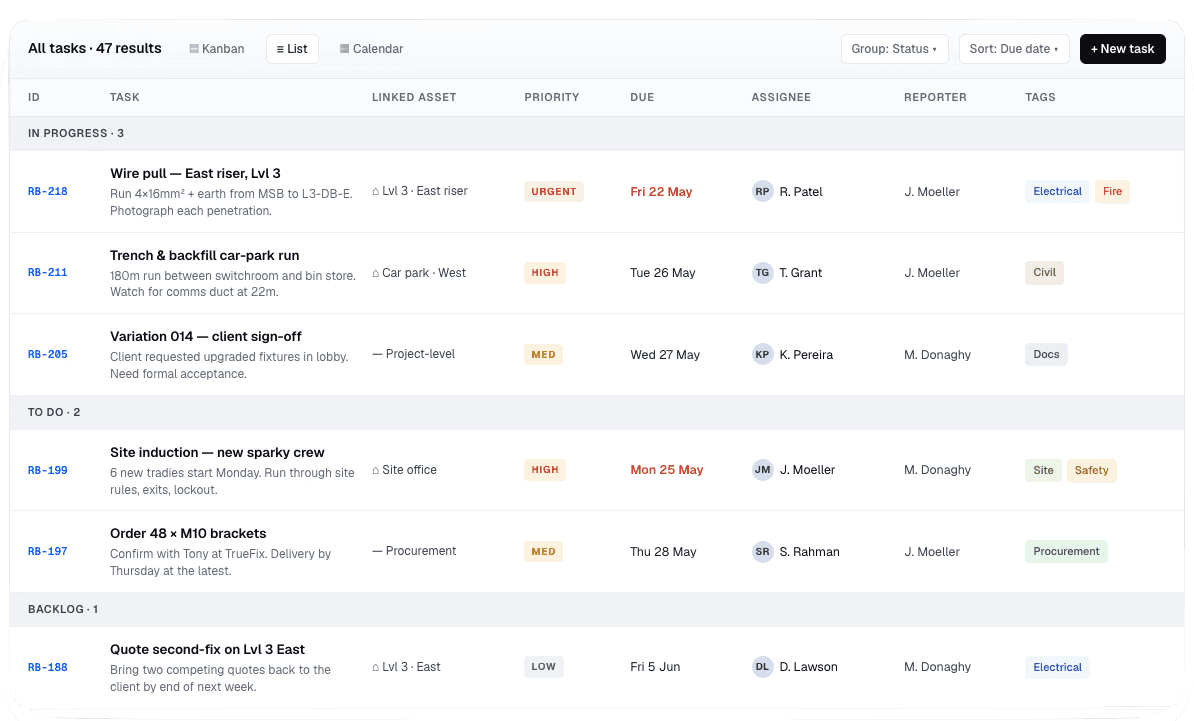
A task system that holds up
Drawings, permits and specs.
In the project, not the inbox.
Drawings, photos, quotes, certificates, scope notes — uploaded once, found by anyone. No more hunting through folders or asking someone to resend a document.
A task system that holds up
One place for every project file.
The story of the job, written down once and collected.
Briefs, scope notes, meeting records, change logs, handover docs — structured pages that live next to the work, not in a separate tool nobody opens.
Cloud memory
Handovers that don’t depend on one person’s memory
Simple and organised
Plain pages with headings, lists, tables and links
Project knowledge pages
Notifications to stay across everything.
Without chasing people.
Real-time alerts when something needs you — a task mention, an urgent flag, a job update from the field. One inbox for the project, not seven.
Nothing slips through, nothing gets lost.
Office plans the work.
The field gets the work.
Push any task to the crew on site.
They see what they need;
Checklist progress
Subtasks
Labels
Due dates
Who’s assigned
All in the RunTRAC mobile app they already use.
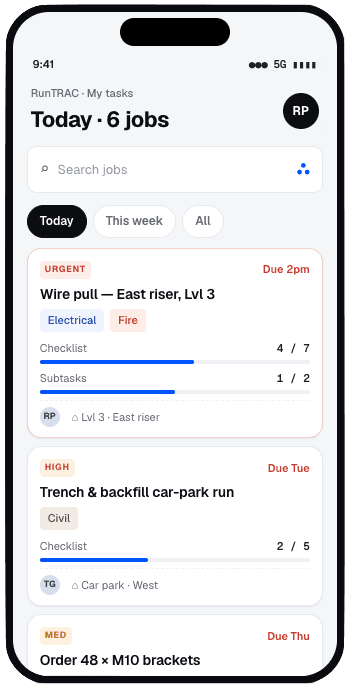
Easy transfer to the field.

AI Intelligence
AI that does the grunt work for you.
AI that does the grunt work for you.
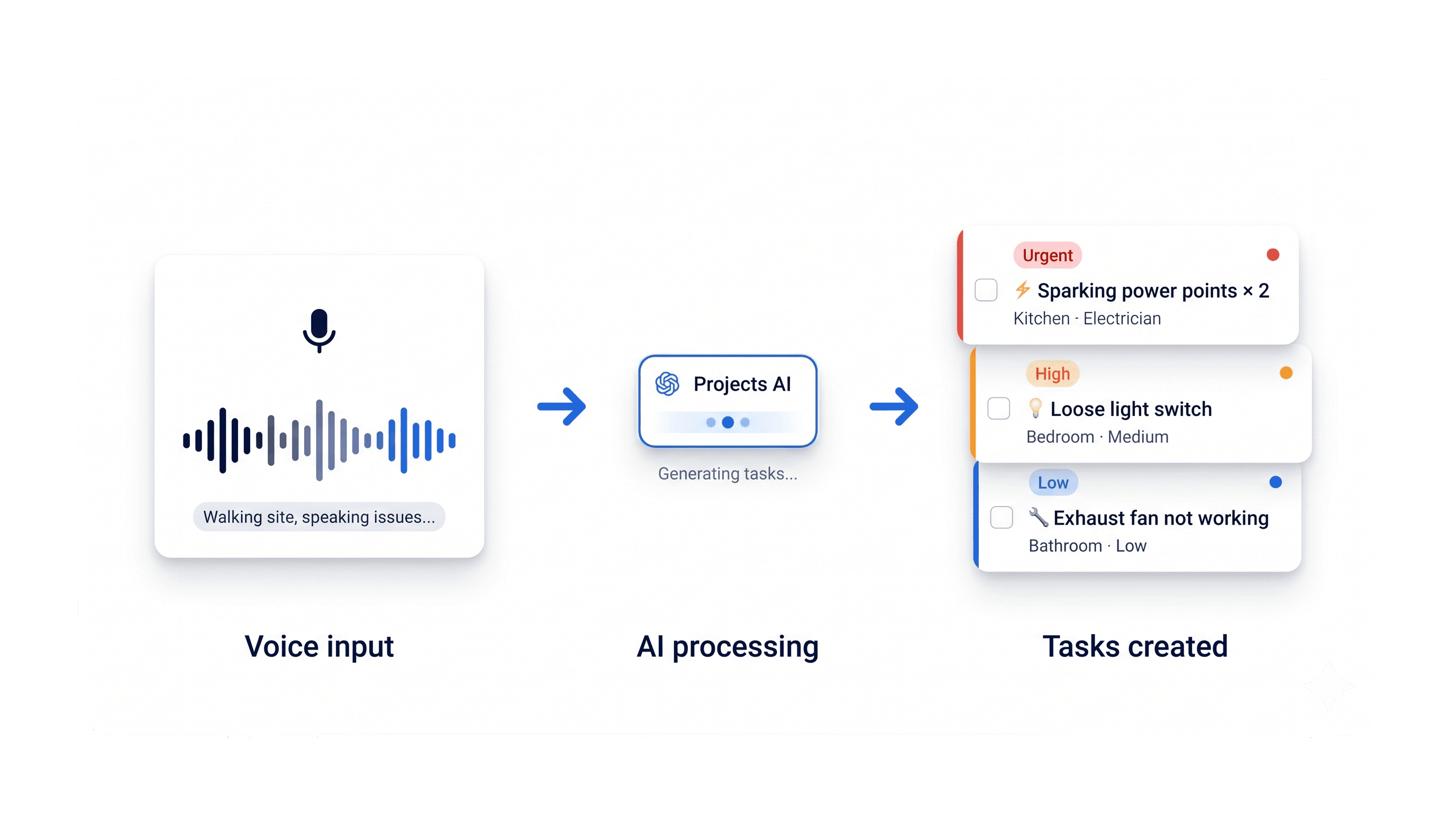
RunboardPRO Projects AI turns what you see, say, and snap into organised project work instantly.
Stop writing up tasks at the end of the day. Stop re-typing notes from site. RunboardPRO Projects AI turns what you see, say, and snap into organised project work — instantly.
Stop writing up tasks at the end of the day. Stop re-typing notes from site. RunboardPRO Projects AI turns what you see, say, and snap into organised project work — instantly.
Stop writing up tasks at the end of the day. Stop re-typing notes
from site.
01
Voice to task
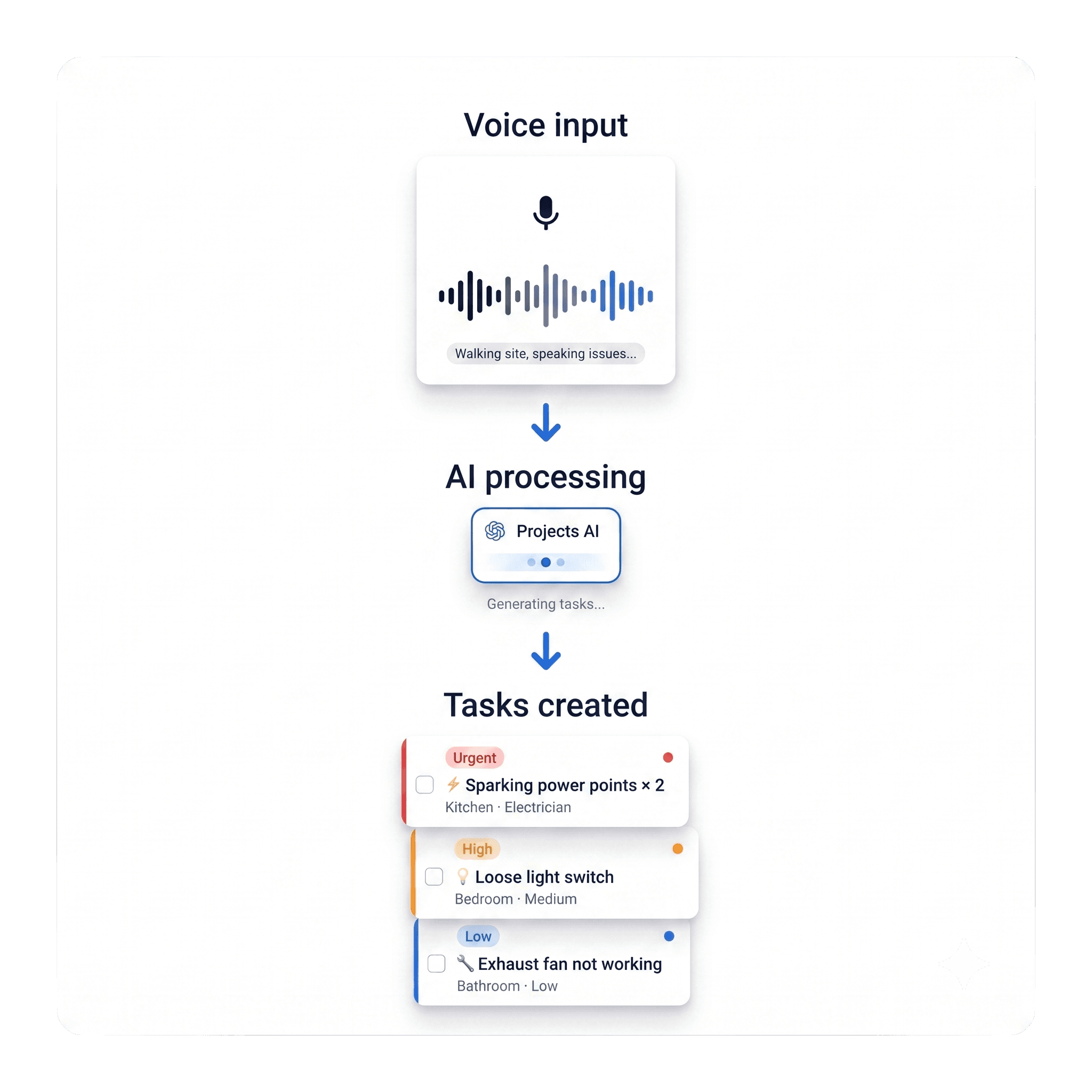
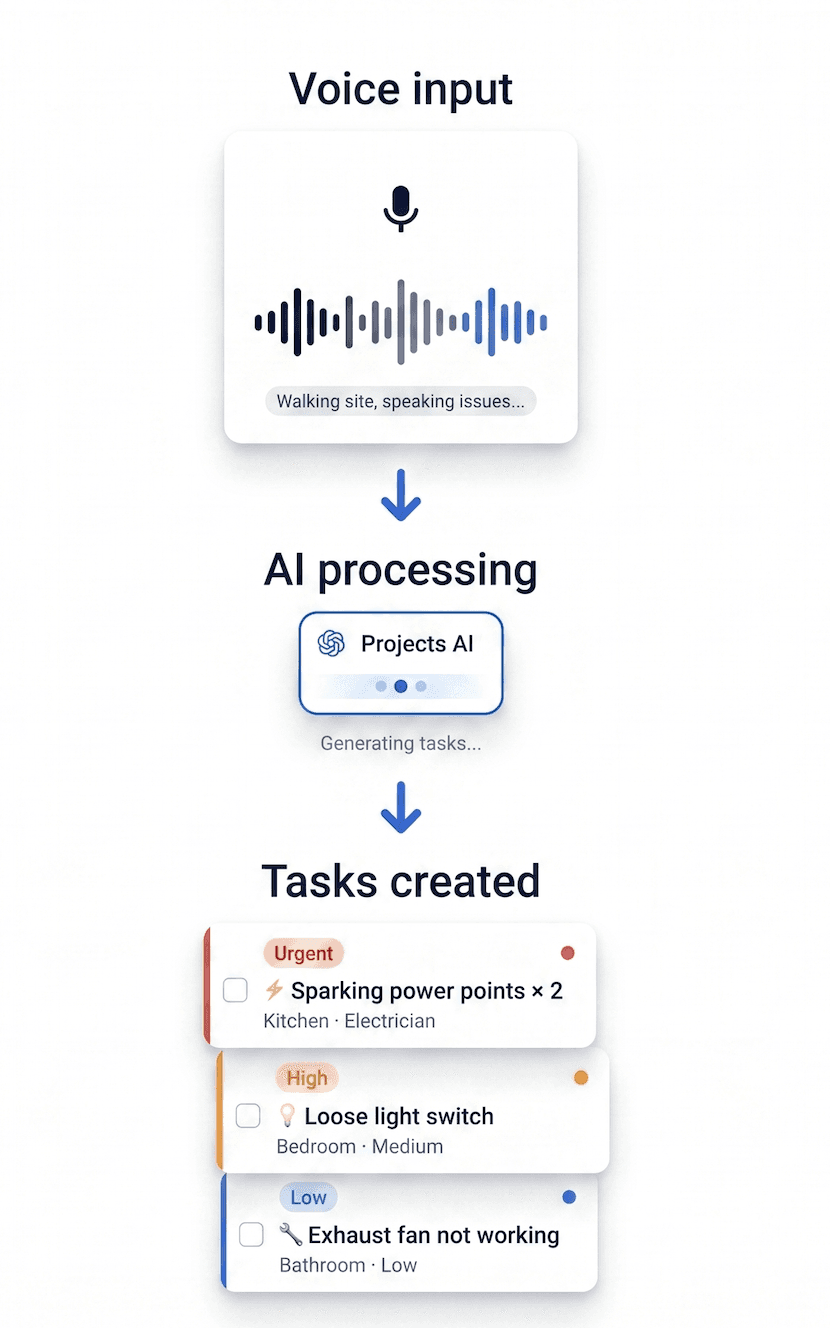
Say what needs doing and it becomes a task. Walk a site, spot an issue, speak it out loud — title, assignee, priority, and checklist generated automatically.
02
Photo to task
Take a photo of an issue on site — a broken fitting, a defect, a damaged surface — describe what you're looking at, and AI turns it into a task with the details filled in.
01
AI search
Ask a question, get an answer. Search across every task, file, contact, note, and knowledge page in the project — without knowing exactly where anything is saved.
03
AI search
Ask a question, get an answer. Search across every task, file, contact, note, and knowledge page in the project — without knowing exactly where anything is saved.
Before & After
What changes on day one.
Same team, same project, same week. The difference is where the work and the context live.
The old way
The old way
Six tools. Three group chats. One headache.
Six tools. Three group chats.
One headache.
Six tools.
Three group chats.
One headache.
Tasks live on a spreadsheet that's a week behind.
Tasks live on a spreadsheet that's a
week behind.
Plans in a folder, comments in a thread, decisions in someone's head.
Plans in a folder, comments in a thread, decisions in someone's head.
Contact list lives in three different phones.
Contact list lives in three different phones.
"Where's the latest scope?" answered four times a day.
"Where's the latest scope?" answered four times a day.
Search means hours scrolling — through email, drive, group chat.
Search means hours scrolling — through email, drive, group chat.
The New way
The New way
Everyone on the same page.
One workspace per project. Everyone on the same page.
One workspace
per project.
One task list, one source of truth, one owner per item.
Plans, comments, and decisions attached to the work that needs them.
Contacts live on the project, linked to actions.
Scope, specs, and decisions on a Knowledge Page with a version history.
AI search across everything in the project — answer in one bar.
Available for approved users.
Projects is in beta. Available for approved users.
Projects is
in beta.
Projects is a separate module inside RunboardPRO. Join the beta to get hands-on with everything below.
Projects is a separate module inside RunboardPRO.
Join the beta to get hands-on with everything below.
FAQ's
FAQ's
FAQ's
Is RunboardPRO Projects included in my RunboardPRO subscription?
What happens to our files? Where are they stored?
What does the beta cost, and what happens at the end of it?
Where do our files live?
Is this only for construction projects?
RunboardPRO


© All rights reserved 2026
About
RunboardPRO
© All rights reserved 2026
About
RunboardPRO
© All rights reserved 2026
About
RunboardPRO
© All rights reserved 2026
About
RunboardPRO
© All rights reserved 2026
About
RunboardPRO
© All rights reserved 2026
About
RunboardPRO
© All rights reserved 2026
About
RunboardPRO
© All rights reserved 2026
About
RunboardPRO
© All rights reserved 2026
About
Used by dispatch and warehouse teams across
Thailand
Germany
Australia
Used by dispatch and warehouse teams across
Australia
Canada
Germany
Thailand
USA
Used by dispatch and warehouse teams across
Used by dispatch and warehouse teams across
Canada
Canada
Germany
Germany
Thailand
Thailand
USA
USA
Australia
Australia
Australia
One connected workspace for project work
RunboardPRO Projects · Beta
Tasks, files, contacts, project knowledge, and field work all organised in one connected workspace.